White-label LMS + student information system
A white-label LMS with the student information system built in
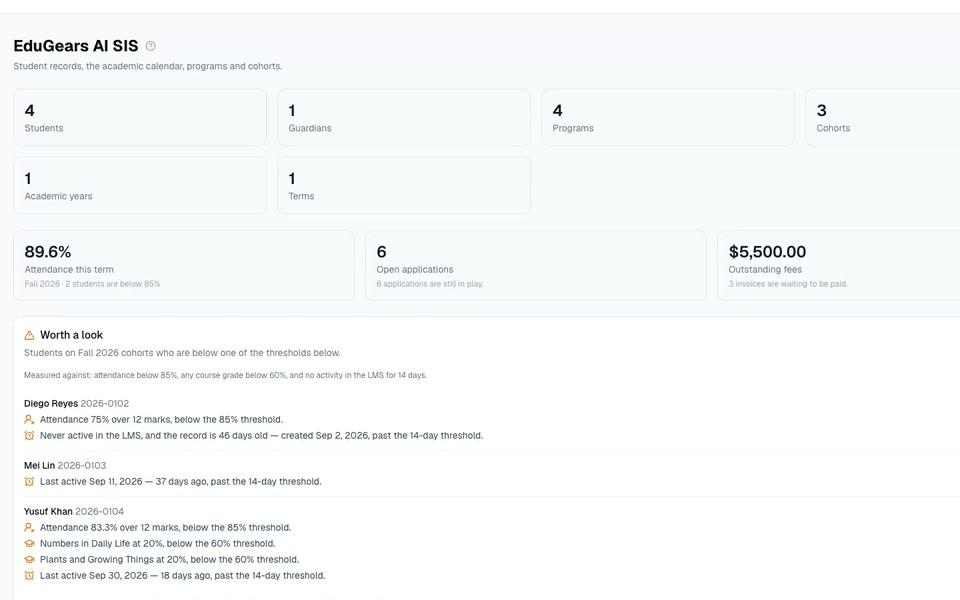
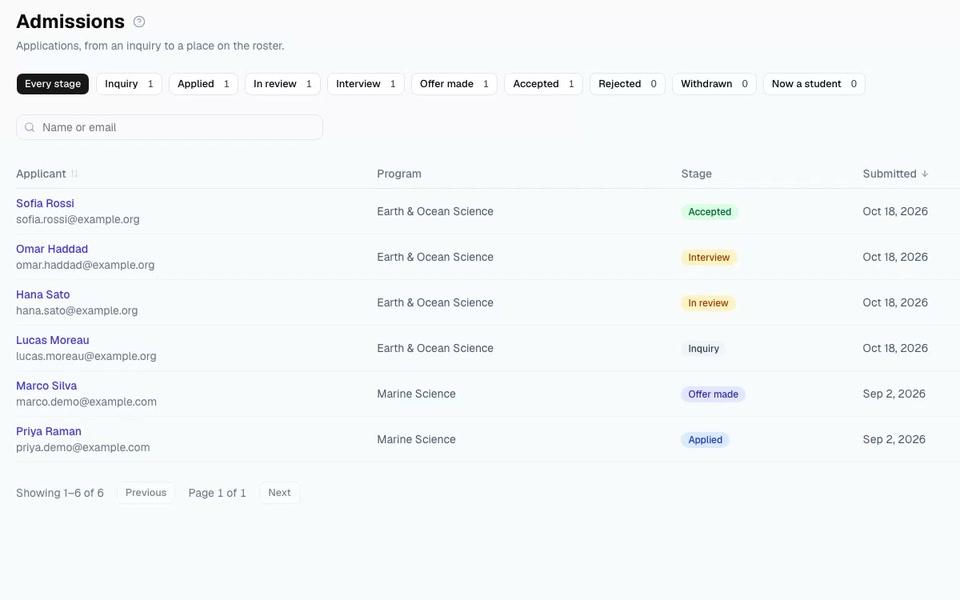
EduGears AI LMS is a white-label learning management system with a student information system built in. Schools, academies and training providers run courses, admissions, attendance, report cards, transcripts, fee records and a guardian portal in one platform on their own domain, with 32 AI tools for building courses and grading, and teachers review and can change every AI mark.
Last reviewed November 2026
The basics
What is a student information system?
A student information system (SIS) is where a school keeps its records about each learner: admissions, enrolment, attendance, report cards, transcripts and fees. A learning management system (LMS) is where the teaching happens: courses, assignments, quizzes and grading. Most schools run the two as separate products and connect them with exports or a sync.
The problem
Two systems, one school
- Rosters are copied from the SIS into the LMS, and drift out of step when a student changes class.
- Marks are re-keyed from the gradebook into report cards at the end of every term.
- Parents get one login for grades and another for attendance and fees.
- Two vendors to pay, two systems to secure, and a sync job nobody owns.
One platform
What "built in" means
Cohorts create classrooms
Put a cohort on a course and its classroom is created, roster included.
Rosters follow the cohort
Add a student to a cohort, or take one out, and its class rosters update. Graded work is always kept.
One login for everyone
Registrars, teachers, students and guardians use one branded platform.
No re-keying
Report cards and transcripts are built from the same gradebook teachers already use.
Your brand
White-label from the sign-in page to the certificate
Your domain
Your own subdomain or a custom domain.
Your look
Your logo and colours on every page, certificate and email.
Your words
Rename Course, Program and Classroom to the terms your school uses.
Your languages
The interface in 13 languages.
AI, with teachers in charge
32 AI tools, and teachers review every AI mark
Courses from a syllabus
Turn a syllabus or your own documents into a course with lesson plans, slides, worksheets and quizzes.
Grading you control
AI marks work against your rubric, and the teacher reviews and can change any mark.
A tutor that knows the course
Learners get an AI tutor that answers from the course materials.
Report comments, drafted
AI drafts report-card comments; staff approve every draft.
Names stay out
In Cog Insights and report-comment drafts, learner names are replaced with codes before anything reaches the AI provider.
Ask about your classes
Ask Cog Insights about a class in plain words; every answer names the report it came from.
Compare
Four ways to run courses and student records
Each approach suits different schools. Here is how they compare on the things that decide it.
| EduGears AI LMS | Course and training platforms1 | Separate SIS + separate LMS | All-in-one school suites | |
|---|---|---|---|---|
| On your own domain, with your branding | Yes | Yes, often plan-dependent | Depends on each product | Varies by vendor |
| Courses, quizzes and grading | Yes | Yes | In the LMS | Varies by vendor |
| Admissions, report cards, transcripts, guardian portal | Built in | Not listed on public feature pages (Nov 2026) | In the SIS | Varies by vendor |
| Attendance | Daily registers per cohort | Session attendance for instructor-led training, in some products | In the SIS | Varies by vendor |
| One login and one roster | Yes | No student-records module to sync | Needs a sync or integration | Varies by vendor |
| AI course building and grading | 32 tools, teacher-reviewed | Varies | Varies | Varies |
1 Course and training platforms: for example LearnWorlds and TalentLMS. Based on each vendor's public feature pages in November 2026. Features change, so check with the vendor.
Who it's for
Built for schools that run their own show
Small and mid-sized private schools
Records, reports and parents in the same place as teaching.
Academies and tutoring centres
Your brand, your cohorts, your parents.
Training providers
Courses, attendance and certificates under your name.
Colleges and continuing education
Programs, terms and transcripts alongside courses.
Standards and privacy
Open standards, careful with student data
- LTI 1.3
- SCORM and Common Cartridge import
- QTI 2.1 question export
- Open Badges 3.0 certificates
- REST API and webhooks
- SAML or OIDC single sign-on
- FERPA and COPPA compliant
- Data processing agreement on request
Questions schools ask
Which LMS has a built-in student information system?
EduGears AI LMS includes a student information system in the same platform as its courses: admissions, student and guardian records, attendance, timetables, report cards, transcripts, fee records and a guardian portal, under your own brand.
Do we still need a separate SIS?
For many small and mid-sized private schools, academies and training providers, no: student records and courses live in one platform with one login. If you need to keep an existing SIS, you can run EduGears AI LMS for courses alone.
Can we use our own domain and branding?
Yes. Each organization gets its own subdomain or a custom domain, with its logo and colours on every page, certificate and email.
Can we bring our existing courses?
Yes. SCORM packages, Common Cartridge files and Moodle backups import as editable courses, and we help with the move during onboarding.
How is student data protected?
EduGears AI LMS is FERPA and COPPA compliant. Each organization's data is kept separate, access is role-based, and in Cog Insights and report-comment drafts learner names are replaced with codes before reaching the AI provider. A data processing agreement is available on request.
Does it collect fee payments?
Fees are kept as records: invoices, part-payments and balances. Payments themselves are collected outside the platform.
How is it priced?
Pricing is agreed during onboarding to fit the size of your organization, and every plan includes the full platform.
See it with your own branding
We set up a demo in your school's colours and show admissions, a course and a report card end to end.